Booking and the diary
An aesthetic clinic booking system with deposits paid to your own Stripe account.
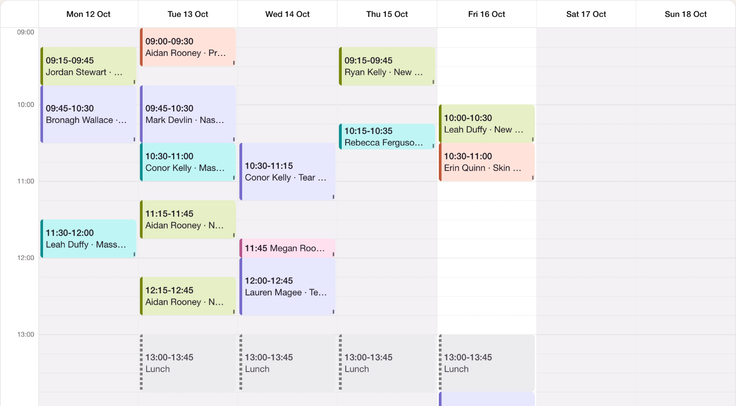
Patients choose a time and pay your deposit. Your team works from the same diary, with forms and records connected to the booking.
Free for 14 days. Cancel before it ends and you pay nothing. Card required.
The direct answer
What is an aesthetic booking system?
An aesthetic booking system lets patients choose available appointments and puts those bookings in the clinic diary. AesthetiClinic connects your branded booking page to practitioner availability, deposits through your own Stripe account and the patient record. No percentage commission on your deposits; Stripe card processing fees apply.
A real product example
She books. You get on with your day.
Your patient can choose a treatment and a time from her phone. This is Lumière Aesthetics, our demo clinic, showing how your own branded booking page could work.
-
For the patient
Choose a treatment, practitioner and available time, then complete the required booking details.
-
For the clinic
Availability comes from your practitioner shifts. The resulting appointment belongs in the diary alongside its patient record.
The demo booking page may accept a real booking. Read its terms before completing one.
Open the Lumière booking page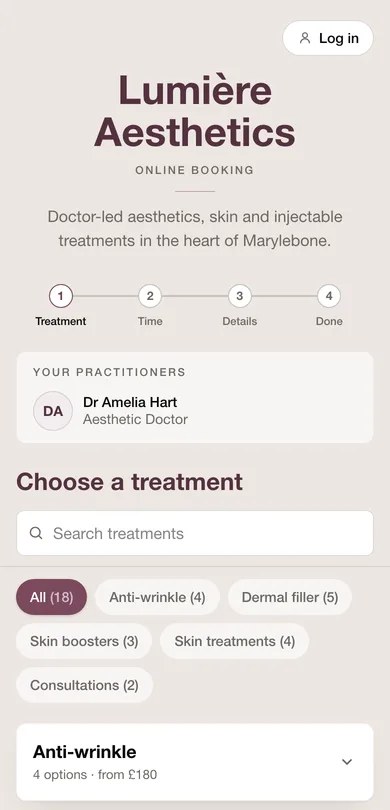
- £25
- plus VAT per practitioner a monthThe whole platform, minimum one bookable practitioner seat.
- 0%
- commission to usPayments settle to your own Stripe account. Stripe's card processing fees apply.
- 7p
- plus VAT per SMSPrepaid in 1,000-message bundles (£70 plus VAT). Email reminders included.
- Your data
- exportable, with no exit feeStructured records and files. Large media libraries may need a further download supplied on request.
From booking to the room
A booking you can prepare for.
The time, deposit and forms belong with the appointment. Your team can pick up where the patient left off.
-
Choose and reserve
Your patient chooses an available time and pays your required deposit.
Set practitioner shifts, treatment availability and your booking policy. Deposits settle to your own Stripe account; Stripe card fees apply.
-
Prepare for the visit
She receives the confirmation, reminder and relevant form links.
Review the appointment and completed forms. Follow up yourself if information is missing or a message does not arrive.
-
Treat and record
At the appointment, you discuss suitability and consent together.
Keep the signed forms, treatment notes and payment details on the patient record.
In their own words
One less thing to worry about.

“The link for the deposits has changed my life!!! This takes away so much worry!”
Dr Victoria Ellison, Dr Victoria Clinic, Saintfield, Co. Down
Owner controls
Your diary, on your terms.
-
Offer times that work for you.
Set when each practitioner can be booked, match staff to treatments and organise the diary around your rooms.
-
Set the deposit before the booking.
Set your reservation fee and rescheduling rules. Make the policy clear before payment; handle refunds and exceptions with human judgement.
-
Age checked before she pays.
Treatments marked as age-restricted ask for a date of birth and block under-18 bookings before payment. Staff still check identity and clinical suitability.
-
A login for each person.
Give reception, practitioners, prescribers and owners the access their work requires.
A gap in the diary. A patient waiting.
Reminders give patients time to plan. When plans change, offer the freed appointment to someone on your waitlist.
-
A reminder before the visit.
Email reminders are included. Optional prepaid SMS and a threaded inbox support patient communication. Check delivery and follow up when needed.
-
Someone waiting for that time.
Matching waitlist patients can receive a claim link when a slot becomes available.
Reminders and waitlist offers do not guarantee attendance.
Keep tomorrow’s appointments in view.
We assess your current export and check imported records and appointments with you before launch.
Questions
Booking questions, answered straight.
What is an aesthetic clinic booking system?
Software that lets patients choose an appointment online and pay a deposit, with a clinic diary, practitioner shifts, cancellation rules and reminders. AesthetiClinic connects the booking to consent forms and the patient record.
How do booking deposits work?
Deposits go through your own Stripe account. No percentage commission on your deposits; Stripe card processing fees apply. You set the deposit amount and publish your cancellation terms; your clinic remains responsible for fair terms, refunds and exceptions.
Can patients book online without calling the clinic?
Yes. Your branded booking page shows availability from your practitioner shifts. Patients choose a time and pay the required deposit from their phone, without downloading an app or creating a patient account.
Does the appointment software help reduce no-shows?
Deposits, automatic email reminders and optional SMS can support your appointment policy. SMS is 7p plus VAT per message, prepaid in 1,000-message bundles. Check message status and follow up if delivery fails.
Is this just booking software, or does it manage records too?
It is the full platform. Booking, e-signed consent forms, clinical notes, photos and treatment records with product batch numbers live together. Staff access depends on their role.
How hard is it to switch our booking system across?
We assess what your current provider can export, agree the migration scope and review the imported records and future bookings with you before launch. What transfers depends on the source export. Keep your existing booking arrangements until the move is checked.
Let’s look at your diary together.
Bring your treatments, forms and questions. We will walk through the jobs your clinic needs to do.
Book a 30-minute demoFree for 14 days. Cancel before it ends and you pay nothing. Card required.